


Captions Lite
4.1405.00 Reviews
App Specs
- Version
- 4.16.0
- Updated On
- License
- Free
- Downloads
- 1,000,000+
- Developer
- Captions
- Categories
- Video Players & Editors
- Platform
- Android, iOS
Screenshots
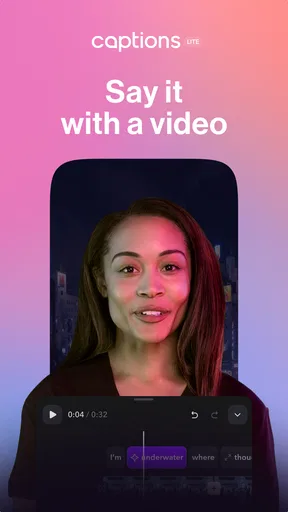
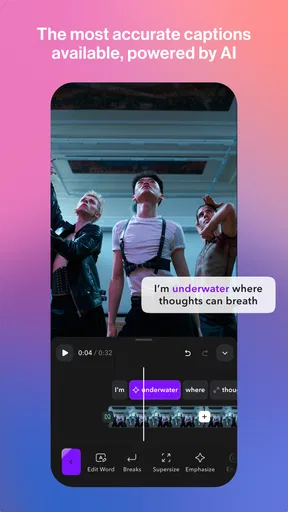
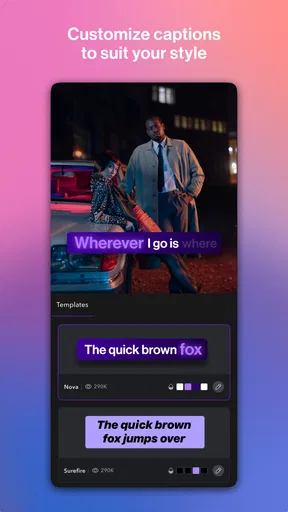
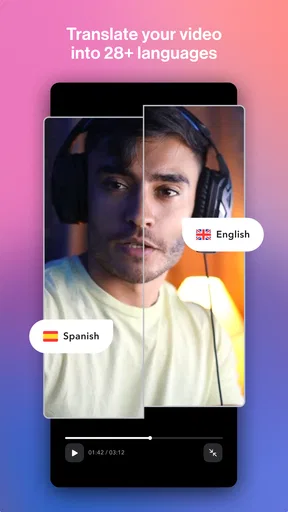
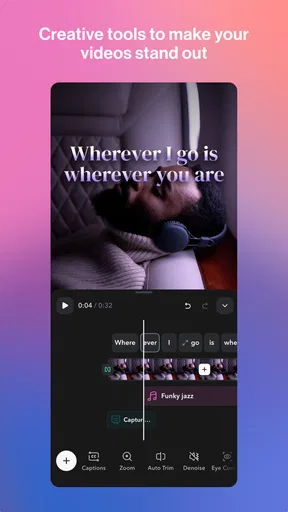
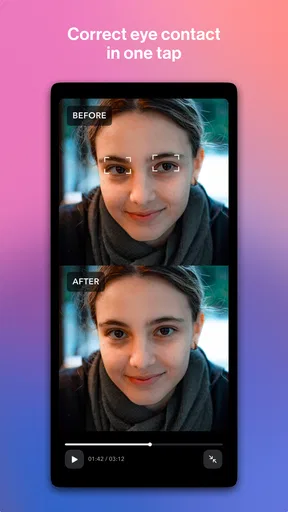
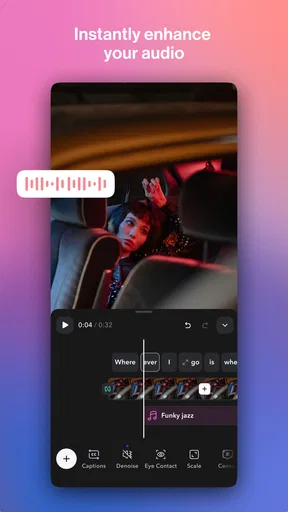
 Analysis by AppCompare
Have you ever found yourself scrolling through social media, admiring those perfectly crafted captions under pictures and thinking, "How do they come up with this stuff?" Well, join the club. If you’re like me and sometimes struggle to find the right words, Captions Lite might just become your new best friend.
When a connection becomes part of the workflow
Captions Lite is listed in the video players and editors category, but the published app experience described here is centered on writing captions for photos and social posts. That distinction matters: I would treat it as a prompt for wording, not as a replacement for a full video-editing suite or a tool for trimming footage, adjusting sound, or building a timeline. The developer is Captions, and its name points toward a broader captioning focus, but I would judge this Lite app by the caption-browsing and sharing workflow rather than assume it includes every capability associated with other products.
Because browsing and sharing are the heart of that workflow, I would plan to use it when my phone has a stable connection, especially if I am looking for current phrases or moving a line into a social platform. If I am already drafting a post while commuting, I can search for a fitting idea and save a favorite before I move on. For a time-sensitive post, though, I would avoid leaving the search until the final seconds: a delayed connection can turn a quick lookup into a pause, and I would rather keep a plain, personal caption ready as a fallback than let the upload moment decide what I write.
A practical routine is to settle the photo and the point of the post first, then search for a phrase that supports that point. A travel picture might call for a playful line, while a small-business product image may need wording that does not distract from the item. I would shortlist a few options instead of choosing the first result, because the best fit is often the one that sounds natural in my own voice after a small edit. That extra check is useful even when the app loads quickly: a popular phrase can be catchy and still feel wrong for the particular image.
Using it on the move without losing your voice
The appeal is strongest on a phone, where the photo, caption search, and social posting can sit in one compact routine. That convenience also makes it easy to rush. I would read the selected line next to the image before sharing, check that it matches the mood, and remove any wording that sounds unlike me. For a creator posting between errands, this is a light way to get unstuck; for someone preparing a polished campaign, a slower review in a notes app or desktop editor may be a better fit.
Here is a realistic use: I take a picture of coffee before a busy morning, know I want to post it, but cannot think of anything beyond “good start.” I can search for a related idea, save two options that feel close, and choose one after looking at the photo again. If the connection is slow, I can write a simple line myself and return to browsing later rather than keep reopening the search. Saving favorites is useful for this kind of repeat moment, although I would still revisit them now and then so my posts do not start sounding copied from a personal template.
What to do when the app or network slows you down
Any workflow that depends on loading a list or sharing through another service can run into friction: a search may take longer than expected, or the handoff to a social platform may not feel immediate. I would first retry the search once, then switch to a saved caption or a short sentence of my own instead of repeating the same action. Before blaming the app, I would also check whether the phone has a reliable connection and whether the destination social app is ready to receive the share. That simple fallback keeps a minor delay from turning into a failed post.
Worth Reading Before You Choose

EA SPORTS FC Mobile 26 Is a Bigger Football Game, but It Takes Time

Flipboard Shows What News Apps Must Do Beyond the Feed

Switching to Android Auto Means Rethinking Your Driving Routine

Google Calendar Makes a Crowded Week Easier to Manage

Ludo King Makes the Most of the Minutes Between Plans

Baby Panda World Brings Quick Play to Modern Phones, but Its Game Library Feels Busy
For an occasional user, the main question is whether a caption helper saves enough mental effort to earn a place on the phone. Captions Lite is free to install, is rated for Everyone, and has an average rating of 4.1 from around 18,000 ratings, with over 1 million installs. Those figures suggest that many people have tried it, but they do not tell me whether its phrases match my taste; the useful test is whether I can find options that sound like something I would actually say. The app includes in-app purchases ranging from $4.99 to $629.99 per item, so I would check the purchase details in the app before committing to anything. I would not assume that every part of the experience is free just because the download is.
Who benefits most, and where alternatives win
I can see this working best for casual social posters, creators who publish frequently, and small-business owners who need a quick starting point for a photo post. Someone who already writes comfortably may find the browsing unnecessary, while a user seeking precise brand copy should treat suggestions as raw material, not finished copy. Compared with writing from scratch in a notes app, Captions Lite offers searchable ideas and saved favorites; compared with a general-purpose video editor, it is the more focused choice for caption inspiration, not a substitute for editing controls. If I need full control over wording, a blank note wins. If I need to shape footage, I would choose an editor built around video tasks.
There is also a useful distinction between a caption that fills space and one that adds context. For a product photo, I would use the app to find a tone, then add the detail a customer actually needs in my own words. For a personal post, I might keep the suggestion nearly unchanged if it fits, but I would avoid using a line just because it sounds polished. A quick read aloud is a good test: if I would never say the phrase to a friend, it probably does not belong under my photo. This small editing step makes a caption helper more useful without making every post sound like it came from the same source.
What is Captions Lite?
If you haven’t heard of it yet, let me introduce you to Captions Lite. This app is a nifty little tool designed to help you find the perfect caption for your photos. Whether you’re posting a selfie, a travel shot, or just a random pic of your morning coffee, Captions Lite has got you covered with a vast array of options to make your post pop.
Getting Started with Captions Lite
First things first, downloading Captions Lite is a breeze. It’s available on both Android and iOS, so no one’s left out of the fun. Once you’ve installed it, the interface is super user-friendly. You’re greeted with a clean and straightforward layout that even your grandma could navigate. (No offense, Grandma!)
Once you’re in, you can browse through various categories like love, travel, food, or even humor. The app lets you search captions by keywords, which is a lifesaver when you’re in a hurry. Just type in what you’re looking for, and voila, a list of options awaits you.
Exploring the Features
This app isn’t just about quantity; it’s about quality too. The captions are creative, engaging, and sometimes downright hilarious. If you’re someone who likes to keep things fresh and relevant, Captions Lite regularly updates its database with trending phrases, ensuring you’re never out of the loop.
One feature I particularly love is the ability to save your favorite captions. It’s like creating your personal stash of go-to lines for when you need a quick post. Plus, you can also share captions directly from the app to your social media platforms, making the whole process seamless.
Why You Might Love It
In a world where visuals dominate, having the right words can elevate your posts to the next level. Captions Lite is perfect for anyone who wants to engage their followers with more than just a pretty picture. It’s especially handy for influencers or small business owners looking to boost their online presence. However, even if you’re just a casual user like me, it’s fun to play around with different captions and see how they change the vibe of your photos.
The choice between using a suggested line and writing your own is not all-or-nothing. I find the most useful approach is to borrow a rhythm or mood, then add one specific detail from the picture: who was there, what made the moment memorable, or what the viewer should notice. That makes the caption feel personal while still giving me a way past a blank screen. For a business post, I would be especially careful not to let a playful suggestion obscure practical information such as what is being shown or why it matters.
If you post in more than one language, I would also read every phrase carefully rather than assume that a category or keyword will return wording that fits your audience. Tone does not always travel neatly between languages or communities, and a joke that feels harmless in one context can land awkwardly in another. Captions Lite is most helpful when I treat its results as choices to review, not as an automatic answer. That judgment is worth the few seconds it takes, particularly for public-facing or professional accounts.
Checking the fit before you publish
For a small-business owner, I would make a short routine out of captioning: choose the photo, search for a tone that fits the post, then add the useful specifics that only the business knows. I would keep the app’s suggested phrasing separate from claims about a product, service, or offer. A catchy line can set a mood, but it should not replace accurate details. This is one reason I would not hand over the final wording to any caption library without reading it in context.
Creators who publish several times a week may value the saved-caption shelf most, because it can reduce repeated searching when a familiar kind of post comes around. Still, I would avoid building a feed from the same handful of saved lines. Reusing a phrase too often can make different photos feel interchangeable. A better habit is to save ideas by mood, then adapt one to the specific image or write a fresh sentence when the subject deserves more attention. The feature is a prompt bank, not a substitute for knowing what I want to say.
Captions Lite is free to download and is rated for Everyone. It is currently version 4.12.0, with a minimum operating-system requirement of 9. The app has been available since March 20, 2024, and its category is video players and editors, even though the practical use described here is caption discovery for social posts. I would check that my device meets the requirement before installing, then explore the app at my own pace. Its 4.1 average from around 18,000 ratings and 389 written reviews can help set expectations, but neither number guarantees that its style will suit me. The in-app purchase range runs from $4.99 to $629.99 per item, so I would look closely at the options and terms shown before making a purchase.
Final Thoughts
All in all, Captions Lite is a fun, practical, and easy-to-use app that adds a little extra zing to your social media game. Whether you’re an aspiring influencer, a seasoned pro, or just someone who loves sharing snippets of their life online, this app has something for everyone. It’s like having a pocket full of creativity that you can tap into whenever you need it. And trust me, once you start using it, you’ll wonder how you ever managed without it.
So, give Captions Lite a shot, and let me know what you think. Who knows, maybe we’ll bump into each other in the comments section, sharing our newfound captioning prowess!
My connectivity verdict
My overall view is that Captions Lite works best as a convenient source of inspiration when I have a few moments and a dependable connection, rather than as something I need to rely on at the exact instant I publish. I would install it if I regularly share photos and sometimes need help finding a tone, but skip it if I want a complete video-editing workspace or prefer to write every caption from scratch. The simple plan is to browse ahead when possible, save a few promising lines, and keep the final wording in my own hands. That balance makes the app useful without asking it to do a job it was not designed for.
Pros
- User-friendly interface
- easy navigation
- Wide variety of caption categories
- Quick integration with social media
- Regular updates with new content
- Offline access for convenience
Cons
- Limited features in free version
- Occasional ad interruptions
- Requires internet for full functionality
- No customization of captions
- Lacks video captioning options
FAQs for Captions Lite
What is Captions Lite and what are its main features?
Captions Lite is a user-friendly application designed to enhance your videos with engaging captions. It offers features like automatic subtitle generation, customizable fonts, and real-time translation. The app is ideal for content creators looking to boost accessibility and engagement on social media platforms. It supports various video formats and languages.
Is Captions Lite available for both Android and iOS devices?
Yes, Captions Lite is available for download on both Android and iOS platforms. Users can easily find the app on the Google Play Store for Android devices and the Apple App Store for iOS devices. Ensure your device meets the minimum system requirements for optimal performance.
Does Captions Lite offer a free version or is it subscription-based?
Captions Lite offers a free version with basic features to help you get started. For more advanced options, like premium fonts and extended subtitle lengths, a subscription model is available. Users can choose between monthly or annual subscriptions to access these additional features.
How accurate is the automatic captioning feature in Captions Lite?
The automatic captioning feature in Captions Lite uses advanced AI technology to ensure high accuracy. While it performs well with clear audio, the accuracy may vary with background noise or strong accents. Users can manually edit captions to correct any errors and ensure precision.
Can Captions Lite translate captions into multiple languages?
Yes, Captions Lite supports real-time translation into multiple languages, making it a versatile tool for reaching a global audience. Users can select their desired language from a list of available options. However, the accuracy of translations may depend on the complexity of the content and language nuances.


